



In brief
- The search terms report shows the real queries your ads appeared for, not just your keywords.
- A weekly 20-minute review finds wasted spend and new keywords; Performance Max now shows its terms too.
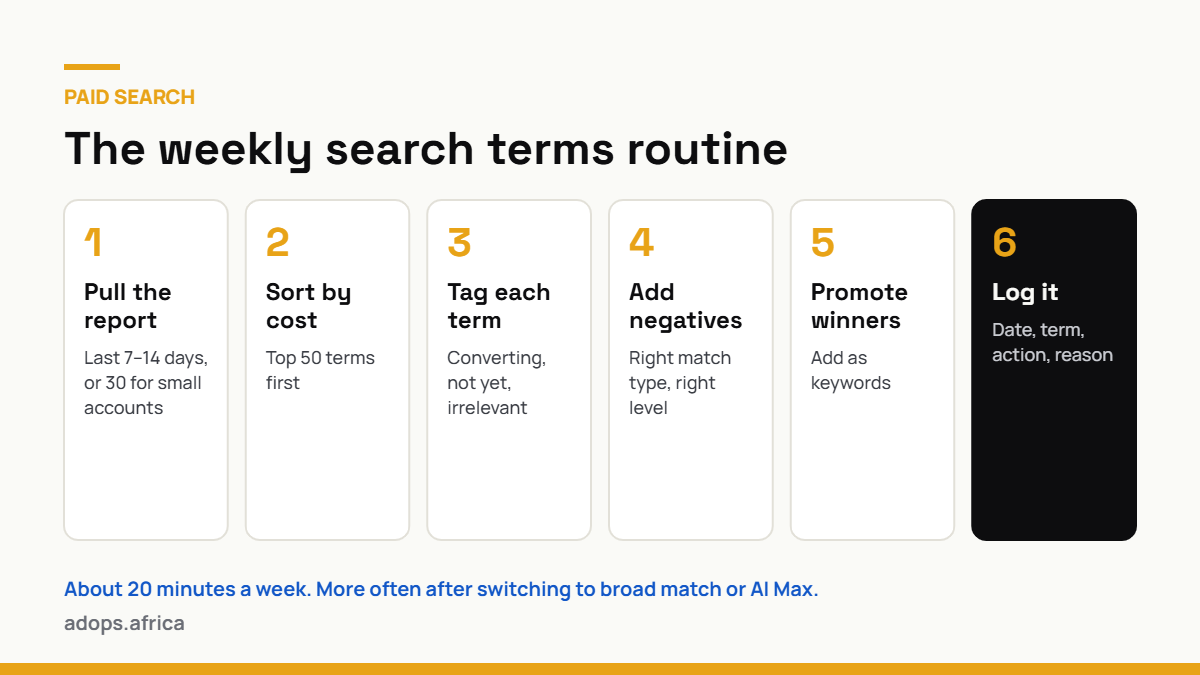
- Sort by cost, tag each term, add negatives, promote winners, and log every change.
Your keywords are what you bid on. Search terms are what people actually typed. The gap between the two is where most paid search budgets leak, and where new opportunities hide. Broad match and AI Max have made that gap wider, so the search terms report matters more than ever. Here’s a weekly routine that takes about 20 minutes.
What the report shows, and what it doesn’t
In Google Ads, open Insights and reports → Search terms for a campaign or the whole account. You’ll see the queries that triggered your ads, with clicks, cost and conversions. Since 2025, Performance Max campaigns show search terms as well, along with whether each one came from your search themes or from Google’s own matching.
Two limits to know. Google doesn’t show every query: terms searched by very few people are grouped out of view for privacy, so the report covers only part of your spend. And Microsoft Advertising has its own report, which needs the same routine.
Match types, briefly
Your keyword’s match type decides how far Google can stray. Exact match stays closest to the keyword, phrase match allows words around it, and broad match lets Google match related meanings, using signals from your account and landing pages. Broad match with Smart Bidding can work well, but only if you watch the search terms. The wider the matching, the more often you need this routine.
The 20-minute routine
- Pull the last 7 to 14 days. For small accounts, use 30 days so there’s enough data.
- Sort by cost, highest first. The top 50 terms usually cover most of the spend you can see.
- Tag each term. Relevant and converting; relevant but not converting yet; irrelevant.
- Add negatives for the irrelevant ones. Use phrase or exact match negatives, and add them at the right level: campaign, or a shared list for the whole account.
- Promote the winners. Add converting terms as keywords in the right ad group, so you control their bids and ads.
- Log what you changed. Date, term, action, reason. Our weekly optimisation routine uses the same log.
What to look for in African accounts
- Jobs and free: ‘vacancies’, ‘learnership’, ‘free’, ‘pdf’, ‘salary’ often waste budget for brands that aren’t hiring or giving things away.
- Local words: South African searchers use ‘bakkie’, ‘braai’, ‘stokvel’, ‘load shedding’. Make sure your keywords and negatives cover how people actually search.
- Languages and spelling: searches mix English with Afrikaans, isiZulu, Pidgin and other languages, and include common misspellings. Some are opportunities, not waste.
- Wrong country: queries mentioning other countries or cities you don’t serve. Check your location settings too.
- Competitor and brand terms: decide deliberately whether to bid on competitors, and make sure your own brand terms aren’t being bought by a broad campaign at a higher cost.
A worked example
A Cape Town furniture retailer bids on broad match ‘office chairs’. In one week, the report shows ‘office chairs’ and ‘ergonomic office chair’ converting well, ‘office chair repairs’ and ‘office chair jobs’ spending R1,200 with no sales, and ‘second hand office chairs’ getting clicks but few conversions.
The actions: add ‘repairs’ and ‘jobs’ as negatives; add ‘ergonomic office chair’ as its own exact match keyword with a dedicated ad; and decide whether second-hand buyers are worth a separate campaign with lower bids, rather than blocking them outright. Ten minutes, and the next week’s budget goes further.
Negative keyword traps
- Negatives don’t match close variants. A negative for ‘cheap’ won’t block ‘cheaper’ or ‘cheapest’. Add the variants you need.
- Don’t over-block. A broad negative like ‘free’ can block ‘free delivery’, which may be a buyer. Check before adding single-word negatives.
- Review negatives quarterly. Products, services and customers change. Remove negatives that now block good traffic.
Performance Max and AI Max
Automated campaigns choose queries for you, so the report is your main window into what they’re doing. Google has expanded negative keyword controls for Performance Max, so you can now block irrelevant themes there too. If AI Max is matching to pages or queries you don’t want, add negatives and URL exclusions rather than switching the campaign off. Our Performance Max vs Search guide covers when automation helps.
When to look more often
Weekly is enough for most accounts. Check daily for the first two weeks of a new campaign, after a switch to broad match or AI Max, and during big sale periods such as Black Friday, when search behaviour changes quickly and wasted clicks cost more.
How to measure success
Track two numbers monthly: the share of spend on terms you tagged as irrelevant (it should fall), and conversions from terms you promoted to keywords (they should rise). If wasted spend doesn’t fall after a month, check that negatives were added at the right level.
Share with your team
Every week: sort search terms by cost, tag them, add negatives, promote winners, log it. Twenty minutes saves real money.
Read next: Smart Bidding and small budgets · Performance Max vs Search in low-volume African markets
Sources
- PPC Land: Google wraps up Performance Max feature rollouts in 2025
- Search Engine Land: Google Ads expands PMax negative keyword limits
Researched and drafted with AI assistance, then reviewed, tested and edited by Pilira Mwambala. See our Editorial & AI Policy.