


In brief
- Most of the core digital marketing stack is free or comes with the ad platforms you already use.
- Map your tools to five stages: plan, activate, track, measure and improve.
- Master the free official tools before paying for extras. Most gaps are in set-up, not software.
Ask ten digital marketers for their favourite tools and you’ll get thirty answers. But the foundation of almost every stack is the same, and much of it costs nothing. Here is a starting map of the essential platforms, grouped by what they do in the campaign lifecycle. All are official tools from the platforms themselves.
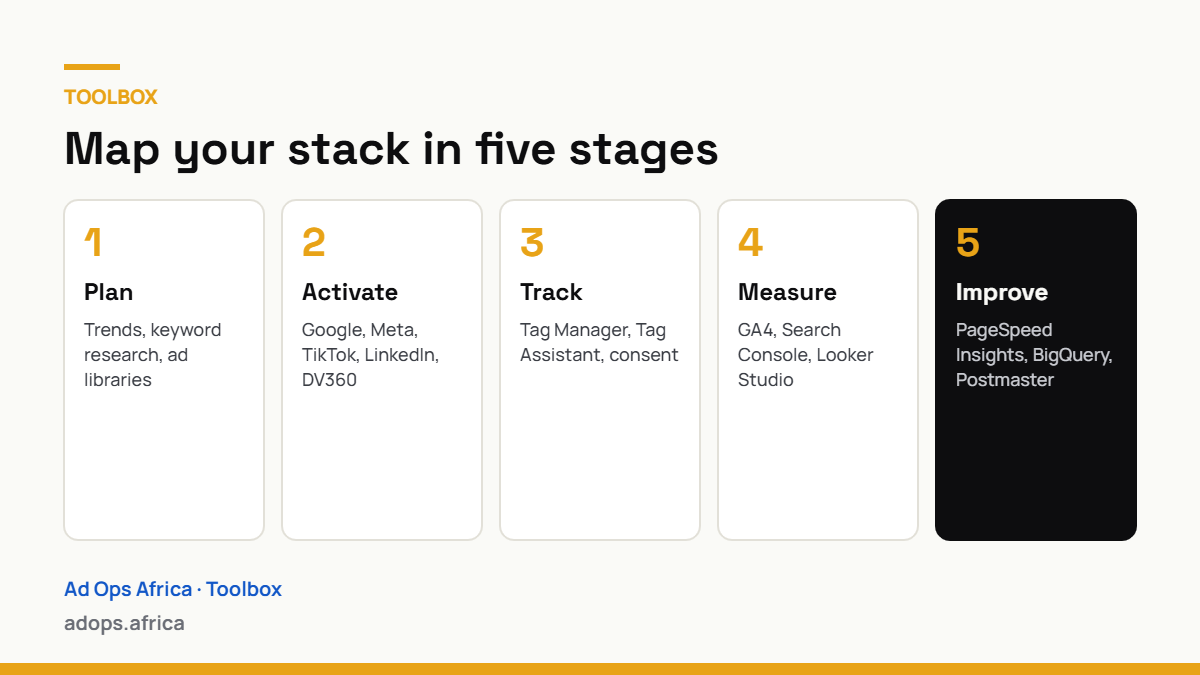
1. Plan
- Google Trends. Compare interest in topics over time and by country. Useful for seasonality and for checking whether a global trend is showing up locally at all.
- Google Ads Keyword Planner. Search volume estimates and keyword ideas, available inside a Google Ads account.
- Meta Ad Library and Google Ads Transparency Center. See the ads competitors are running, by country. Good for briefs and creative reviews.
2. Activate
- Google Ads, Meta Ads Manager, TikTok Ads Manager and LinkedIn Campaign Manager. The self-serve buying platforms. Each is free to open; you pay for media.
- Display & Video 360. Google’s enterprise programmatic platform, usually accessed through an agency or a direct contract. Our programmatic explainer covers where it fits.
3. Track
- Google Tag Manager. Manage tags without changing site code each time. Run our GTM container audit before every major launch.
- Tag Assistant. Check that Google tags fire as expected, with GTM Preview and GA4 DebugView.
- Meta Pixel and Conversions API. Browser and server-side tracking for Meta, best used together with deduplication.
- A consent management platform. Needed for Consent Mode; see our Consent Mode guide.
4. Measure
- Google Analytics 4. The free standard for website and app analytics. Start with our guide to GA4 for campaign teams.
- Google Search Console and Bing Webmaster Tools. How your site performs in organic search, which queries bring people in, and any technical problems.
- Looker Studio. Free dashboards that connect GA4, Google Ads, Search Console and spreadsheets.
5. Improve
- PageSpeed Insights. Test how fast your landing pages load on mobile and what slows them down. It matters more where data is expensive.
- BigQuery sandbox. Query your GA4 export without a credit card, within free limits. Our BigQuery guide has starter queries.
- Google Postmaster Tools. Spam rate and reputation for email sent to Gmail; see our email measurement guide.
What does it mean in African markets?
Budgets are tighter, so free tools matter more, and they cover most of what a campaign team needs. The bigger gap is usually skills and set-up: a GA4 property nobody configured or a GTM container nobody audited. Before you buy a new tool, check whether the free one is set up properly.
What should you do next?
- List every tool your team uses and map it to the five stages. Look for gaps and duplicates.
- Name an owner for each tool, and review who has access every quarter.
- Pick one free tool your team underuses and train on it this month.
How do you measure success?
- Every stage of the campaign lifecycle has at least one tool with a named owner.
- Fewer tools doing the same job, and lower spend on tools nobody opens.
- Faster answers: how long it takes your team to explain a change in results.
Share with your team
Our core stack is mostly free: plan with Trends and Keyword Planner, activate in the platforms, track with Tag Manager, measure with GA4 and Search Console, and improve with PageSpeed Insights. Let’s check every tool has an owner and is properly set up before we buy anything new.
Read next: GA4 for campaign teams · GTM container audit
Sources
- Google Trends
- Google Ads: Keyword Planner
- Meta Ad Library
- Google Ads Transparency Center
- Google Cloud: BigQuery sandbox
- PageSpeed Insights
Researched and drafted with AI assistance, then reviewed, fact-checked and edited by Pilira Mwambala. See our Editorial & AI Policy.