


In brief
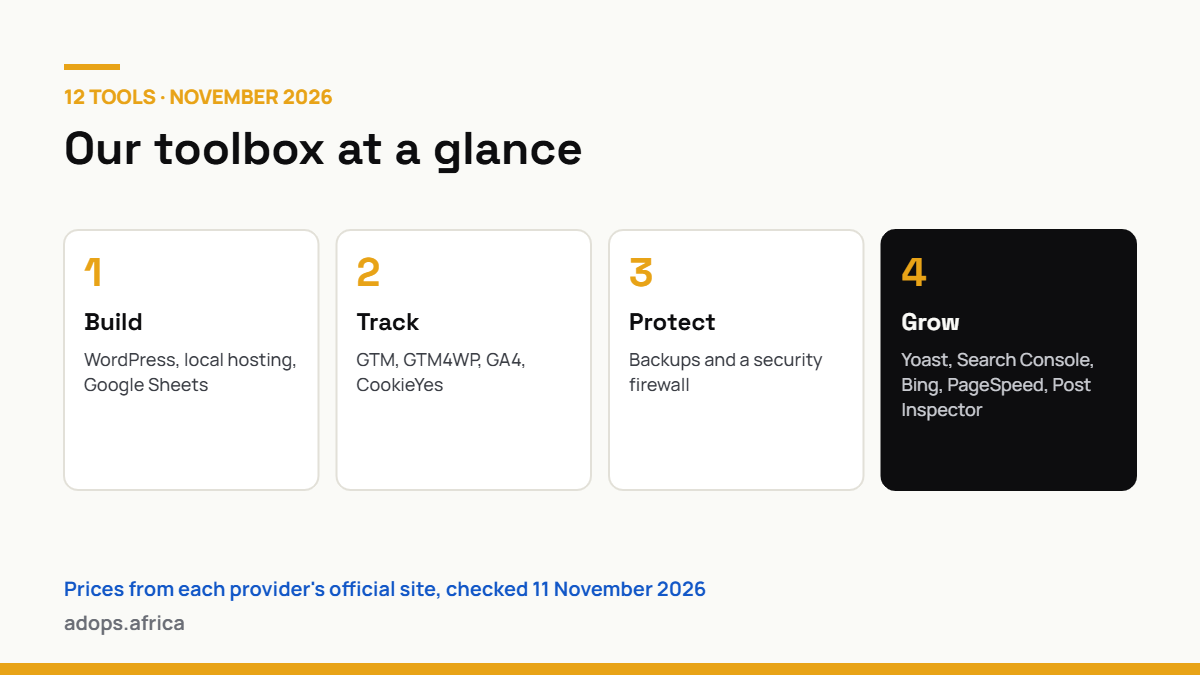
- These are the 12 tools we actually use to build, track, protect and grow Ad Ops Africa.
- Eleven of the twelve have a free version. The real costs are hosting and your time.
- Prices were checked on each provider’s official site on 11 November 2026.
When we built Ad Ops Africa, we wanted to know what a working, measurable website really costs. Here is our honest answer: the 12 tools we use every week, what each one does, and what it costs. Nobody paid to be on this list, and there are no affiliate links. For a wider map of platforms for planning, buying and measuring campaigns, see our digital marketer’s toolkit. This list is narrower: it’s what we run ourselves.
Build
1. WordPress and local hosting. WordPress itself is free, open-source software. We host with xneelo, a South African provider, whose WordPress hosting starts from R99 a month including VAT. Paying in rand protects you from exchange-rate swings.
2. Google Sheets. Free with a Google account. Our whole content engine runs on one shared spreadsheet: the content calendar, ideas backlog and the list of sources we watch for news.
Track
3. Google Tag Manager. Free. Every tracking tag on the site runs through one container, so we never edit the site’s code to add or change tracking.
4. GTM4WP plugin. Free. It connects WordPress to Tag Manager and pushes useful page data, such as categories and authors, into the data layer.
5. Google Analytics 4. Free for standard properties. One setting to change on day one is data retention, which defaults to two months; here’s why.
6. CookieYes. Our cookie banner and consent manager, which feeds Google’s Consent Mode. CookieYes has a free plan for up to 5,000 page views a month per domain; paid plans start at US$10 a month (Basic, 100,000 page views). Watch the limit as your traffic grows. Our POPIA and cookies guide explains why this matters.
Protect
7. A backup plugin. It backs up the database and files to remote storage, away from the server. Free versions of the main WordPress backup plugins do what most sites need. We take a full backup before every big change, as we did on launch morning.
8. A security firewall plugin. It blocks malicious traffic and scans for malware. Free versions are enough to start; paid plans add faster threat updates and support. We don’t name the security tools we use, and we’d suggest you don’t either.
Grow
9. Yoast SEO. Free. It writes our meta descriptions, social sharing tags and XML sitemap. Yoast SEO Premium costs 118.80 a year before VAT (US dollars by default) and adds features such as redirects and internal-linking suggestions.
10. Google Search Console. Free. It shows which searches bring people to the site and whether Google can index our pages. We submitted our sitemap there on launch day.
11. Bing Webmaster Tools. Free. The same for Bing, and you can import your sites straight from Search Console in a few clicks.
12. PageSpeed Insights and LinkedIn Post Inspector. Both free. PageSpeed Insights tests how fast pages load on mobile and desktop. Post Inspector shows exactly how a link will look when shared on LinkedIn, and refreshes LinkedIn’s copy of it.
Why should you care?
A professional, measurable site no longer needs a big software budget. Our main fixed cost is hosting; almost everything else is free. The real investment is time and skills: setting up Tag Manager properly, getting consent right, and checking that the numbers make sense.
What does it mean in African markets?
Most of these tools are priced in US dollars, so a weaker rand, naira or shilling makes them more expensive overnight. Start with free tiers, pay annually only when you’re sure, and prefer local hosting where you can. Speed matters too: many of your readers pay for mobile data, so check PageSpeed on mobile before you add another plugin.
What should you do next?
- List what you pay for. Many teams pay for tools that a free tier would cover.
- Check your consent set-up. If you use GA4 or ad platforms, make sure your banner and Consent Mode work together.
- Set up backups before anything else. A plugin update can break a site; a backup is the fastest way back.
- Register with both search consoles. Google and Bing are free and take minutes.
How do you measure success?
- Cost per month for your whole stack, tracked in rand, not dollars.
- PageSpeed scores on mobile after every new plugin.
- Indexed pages in Search Console against pages published.
- Backup health: date of the last successful full backup.
Share with your team
Before we buy another tool, we’ll check whether a free tier or something we already use covers it, and we’ll test page speed on mobile after every new plugin.
Read next: The digital marketer’s toolkit · Server-side tagging: when is it worth it?
Disclosure: Ad Ops Africa has no commercial relationship with any company on this list, and none paid to be included. If that changes, we will say so here.
Sources
- xneelo: WordPress hosting (prices VAT inclusive)
- CookieYes: Pricing
- Yoast: Yoast SEO Premium pricing
- Google Tag Manager
- Bing Webmaster Tools
- LinkedIn Post Inspector
Researched and drafted with AI assistance, then reviewed, fact-checked and edited by Pilira Mwambala. See our Editorial & AI Policy.