



In brief
- Ten copy-and-paste AI prompts for planning, buying and reporting, tested on real media work.
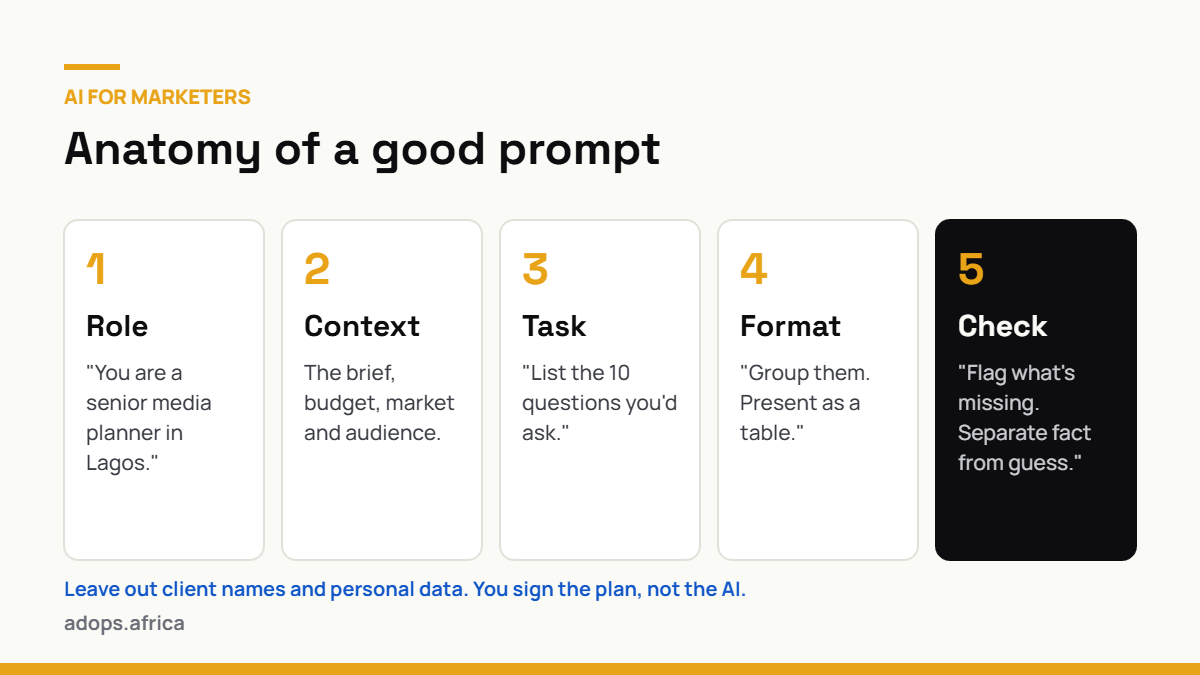
- Good prompts give a role, context, a task, a format and a check.
- Anonymise client data first, and always check the output before it goes out.
Most media planners use AI the same way: a one-line question, a generic answer, and a lot of editing. The difference between that and a useful first draft is the prompt. Here are ten we’ve tested on real planning, buying and reporting tasks. Copy them, fill in the brackets, and save the ones that work for you.
First, a rule about client data
Don’t paste personal information, confidential client data or unreleased results into a consumer AI tool. Use your company’s approved tool, or anonymise first: replace names with “Client A” and round the numbers. Under POPIA, you’re responsible for where that data goes.
Planning
1. Turn a brief into questions.
You are a senior media planner in [country]. Read this client brief and list the 10 questions you'd ask before planning, grouped by objective, audience, budget, measurement and timing. Flag anything missing or contradictory.
[paste brief]
Why it works: It gives the AI a role and a structure, so you get questions grouped the way a planner thinks, not a generic list. The last line catches the gaps that cost you a week later.
2. Build an audience picture.
Describe the media habits of [audience, e.g. 25–34 urban professionals in Lagos]: devices, platforms, times of day, and content they trust. Separate what's well documented from what's assumption, and say which sources I should check.Why it works: Asking it to separate evidence from assumption is the most useful habit you can build. AI is confident about audiences it knows little about, especially outside the US and Europe.
3. Draft a channel split.
Propose a channel split for a [R amount] [objective] campaign over [weeks] in [market]. Give percentages, the role of each channel, the main KPI per channel, and the two biggest risks of this split. Present it as a table.Why it works: Asking for risks forces a balanced answer instead of a sales pitch for one channel. The table makes it easy to paste into your plan and challenge line by line.
Buying and set-up
4. Write a naming convention.
Create a campaign naming convention for Google Ads, Meta and DV360 that encodes client, market, objective, channel, audience and flight date. Show five examples and a rule for each field.Why it works: Consistent names are what make cross-platform reporting possible. Five worked examples show you quickly whether the rules hold up in practice.
5. QA a trafficking sheet.
Check this trafficking sheet for errors: mismatched dates, broken or missing UTMs, wrong sizes, duplicate placement names and missing click-through URLs. List each problem with its row number.
[paste sheet as CSV]
Why it works: This is tedious work AI does well, because the rules are clear. Asking for row numbers means you can check each issue in seconds.
6. Generate ad variations.
Write 10 Google Ads headlines (max 30 characters) and 4 descriptions (max 90 characters) for [product] aimed at [audience] in [market]. Use South African English, avoid superlatives the client can't prove, and count the characters for each.Why it works: Character limits are where AI copy usually fails, so make it count. The line about superlatives keeps you clear of claims the Advertising Regulatory Board could challenge.
Reporting and analysis
7. Explain the numbers.
Here is last week's campaign data. Write three sentences a client could read: what happened, the most likely reason, and what we'll change. Don't invent causes the data doesn't support; say what you'd need to confirm.
[paste data]
Why it works: Clients want a story, not a spreadsheet. The instruction not to invent causes is the guard rail: AI will happily explain a dip with a reason it made up.
8. Find the anomaly.
Compare these two weeks of data by channel and campaign. List any metric that moved more than 20%, rank them by spend impact, and suggest one check for each.Why it works: A fixed threshold and a ranking by spend stop the AI from listing every small wobble. You get the three things worth investigating first.
9. Write the formula.
Write a Google Sheets formula that [task, e.g. calculates CPA by campaign from columns A–F]. Explain each part in one line and give a test case.Why it works: Asking for an explanation and a test case means you understand the formula before it goes into a client report, and you can fix it when the sheet changes.
10. Prepare the post-campaign analysis.
Draft the structure for a post-campaign analysis: objectives vs results, what worked, what didn't, learnings and recommendations. Under each heading, list the data I need to fill it in.Why it works: It gives you the skeleton and a data checklist in one go, so the post-campaign analysis starts on day one of the campaign, not the week after.
Save them where you work
A prompt you have to find again is a prompt you won’t use. Keep them in a shared team document, or in your tool’s saved-instructions feature: ChatGPT and Gemini offer custom instructions and reusable assistants, and Claude has Projects. Add your market, currency and house style once, and every prompt starts from the right context.
Make them better
- Give it a role and a market. “Senior planner in Nairobi” beats no context at all.
- Ask for a format. A table, three sentences, a numbered list. It saves the editing.
- Ask it to separate fact from guess. The biggest risk with AI isn’t bad writing; it’s confident numbers that aren’t real.
- Always check. You sign the plan, not the AI.
Read next: How to show up in AI Overviews and AI answers · The 10 free certifications every African media planner should have
Sources
- Google Ads Help: About responsive search ads (headline and description limits)
- Advertising Regulatory Board (South Africa)
Researched and drafted with AI assistance, then reviewed, tested and edited by Pilira Mwambala. See our Editorial & AI Policy.